ip
Tasker User Guide
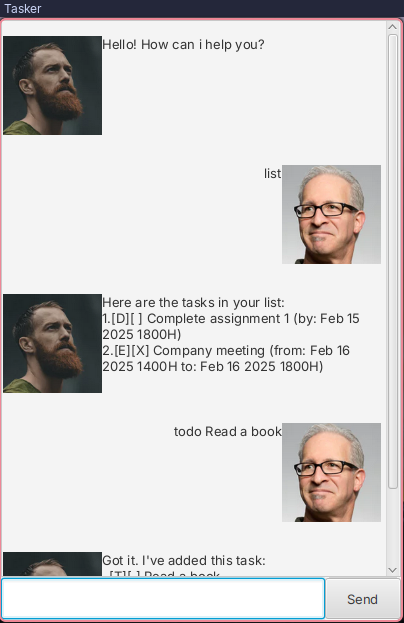
Your Ultimate Task Management Companion
Stay organized, productive, and in control with Tasker, the all-in-one task manager designed to simplify your life. Whether you’re managing daily to-dos, tracking deadlines, scheduling events, or handling fixed-duration tasks, Tasker has you covered. With its intuitive interface and powerful features, you’ll never miss a beat.
Input format
description: A string for the task description.- The character
|is not allowed. - The description ends when a whitespace followed by
/is encountered, as everything after is treated as command arguments.
- The character
datetime: A date and time in the formatd/m/yyyy HHMM.d: 1 or 2 digit of the day.m: 1 or 2 digit of the month.yyyy: 4 digit of the year.HH: 2 digit 24H format of the hour.MM: 2 digit of the minutes.
hours: A positive integer of the hours required.minutes: A positive integer of the minutes required.index: An integer representing a task’s index, obtained from the number beside it in the list command..term: A string to search the tasks description with.
Whitespaces between command parts are ignored.
Adding tasks
Todos
Adds a simple task with a description to be done
Usage
todo {description}
Example
Input
todo Read a book
Output
Got it. I've added this task:
  [T][] Read a book
Now you have 1 tasks in the list.
Note
- Todo task label is
T
Deadlines
Adds a task with a description and a deadline to complete it by.
Usage
deadline {description} /by {datetime}
Example
Input
deadline Complete assignment /by 15/2/2025 1800
Output
Got it. I've added this task:
  [D][] Complete assignment (by: Feb 15 2025 1800H)
Now you have 2 tasks in the list.
Note
- Deadline task label is
D - Can be in the past
Events
Adds a task with a description, a start and an end time.
Usage
event {description} /from {datetime} /to {datetime}
Example
Input
event Company meeting /from 16/2/2025 1400 /to 16/2/2025 1800
Output
Got it. I've added this task:
  [E][] Company meeting (from: Feb 16 2025 1400H to: Feb 16 2025 1800H)
Now you have 3 tasks in the list.
Note
- Event task label is
E datetimefor/frommust not be after that for/to- Can be in the past
Fixed duration tasks
Adds a task with a description and a required duration to complete
Usage
fixed {description} /hr {hours} /min {minutes}
Example
Input
fixed Wash clothes /hr 1 /min 45
Output
Got it. I've added this task:
  [F][] Wash clothes (needs: 1H 45M)
Now you have 4 tasks in the list.
Note
- Fixed duration task label is
F
Managing tasks
Listing
Lists all tasks in the list.
Usage
list
Example
Output
Here are the tasks in your list:
1.[T][] Read a book
2.[D][] Complete assignment (by: Feb 15 2025 1800H)
3.[E][] Company meeting (from: Feb 16 2025 1400H to: Feb 16 2025 1800H)
4.[F][] Wash clothes (needs: 1H 45M)
Marking
Marks a task as complete.
Usage
mark {index}
Example
Input
mark 1
Output
Nice! I've marked this task as done:
  [T][X] Read a book
Notes
- Marking an already marked task produces the same output, and keeps the task marked.
Unmarking
Unmarks a task from being complete.
Usage
unmark {index}
Example
Input
unmark 1
Notes
- Unmarking an already unmarked tasks produces the same output and keeps the task unmarked.
Output
Ok, I've marked this task as not done yet:
  [T][] Read a book
Finding
Finds a task containing the search term in its description.
Usage
find {term}
Example
Input
find read
Output
Here are the matching tasks in your list:
  [T][] Read a book
Notes
- Matches partially.
- Case insensitive.
Deleting
Deletes a task from the list.
Usage
delete {index}
Example
Input
delete 1
Output
Noted. I've removed this task:
  [T][] Read a book
Now you have 3 tasks in the list.
Storage
Tasks are stored and loaded from the file at ./data/tasker.txt